

Error 500 de ModSecurity
Actualizado hace 3 meses
ModSecurity es nuestro Firewall de aplicaciones web. Su función es detectar y bloquear inyecciones de código malicioso en los sitios web de nuestros clientes.
Es posible que este módulo genere falsos positivos, ocurriendo que una edición de algún archivo genere un error 500 bloqueándose el permiso (a pesar ser ejecutada por un administrador autorizado).
Si este fuera el caso, te recomendamos que apagues ModSecurity desde tu cPanel de manera temporaria. Para lograr esto, primero ingresa a tu cPanel a la dirección que te mostramos abajo, reemplazando "midominio.com" por la URL real de tu sitio.

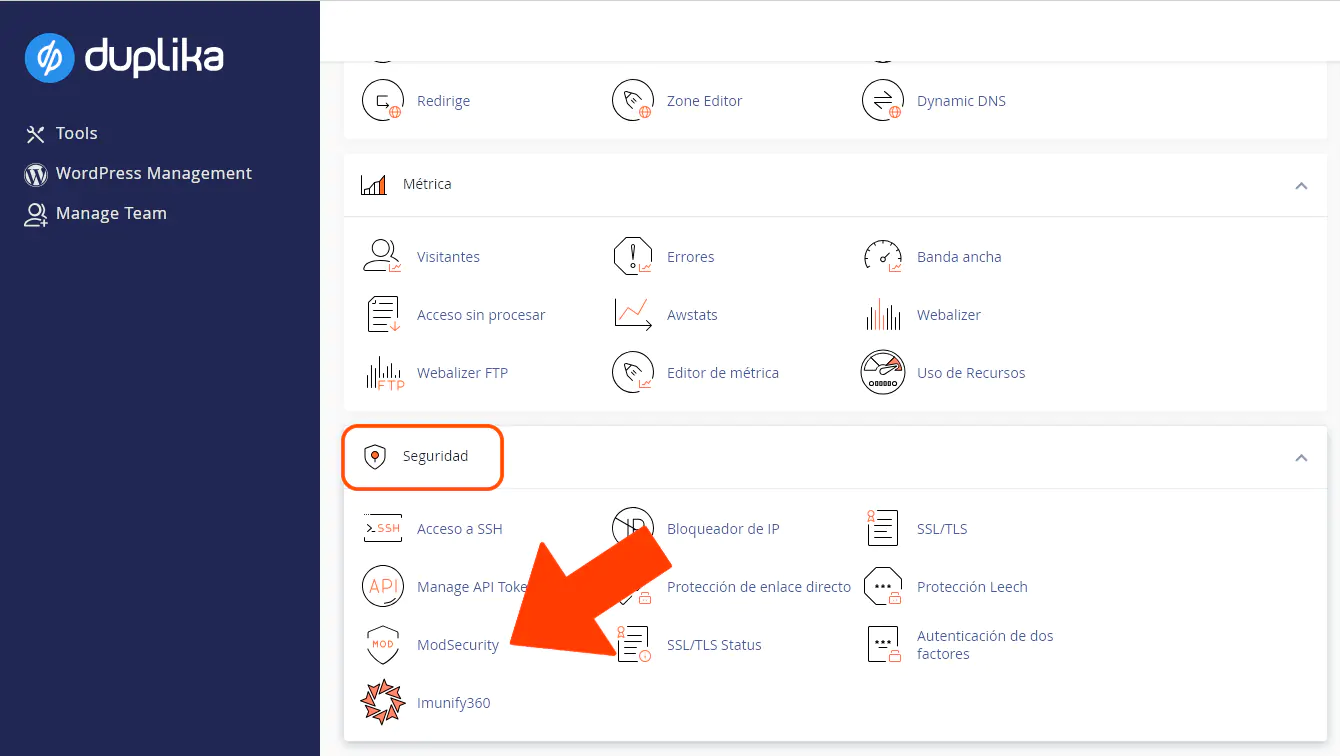
Una vez dentro de tu panel, busca el ícono de ModSecurity en el área de Seguridad.
Tras entrar a la herramienta, haz clic sobre el botón Deshabilitar.
Si tras esta acción el error se ha solucionado, por favor escríbenos para que podamos identificar la regla problemática y desactivarla. Hecho esto, te notificaremos para que puedas proceder con tus ediciones sin la necesidad de tener que mantener apagado ModSecurity en tu cuenta.