

Qué es un dominio de Internet: tipos, ejemplos y DNS
Actualizado hace 3 semanas
Un "dominio", en términos de internet, es el nombre de un sitio web.
El nombre de un sitio web es único. No pueden haber dos dominios iguales. Sí es cierto que puedan existir dos similares, como "pepito.com" y "pepito.net", pero enseguida advertimos que parte del nombre de un dominio es su "extensión". Para el primer caso, ".com", y para el segundo ".net". Entonces, vemos que un dominio tiene dos partes: su nombre propiamente dicho, y su extensión.
Citando un ejemplo propio, el de nuestra empresa Duplika, su nombre de dominio es "duplika.com".
De tal nombre, tal IP...
El nombre de dominio tiene su equivalente en una dirección física para un sitio web. En la jerga, se dice que un dominio "apunta a una IP": IP es un número único también, la identidad de la computadora física que aloja los archivos que componen el sitio web. De la misma manera en que una casa requiere de una dirección con código postal, una página web necesita de un nombre de dominio para poder ser identificada.
Gracias a esta identidad, en el mundo de internet un explorador puede traer los textos, imágenes, videos, etc. de un servidor físico a nuestro teléfono o computadora. ¿Cómo? Porque a partir del nombre del dominio, por ejemplo "duplika.com", nuestro explorador de internet (Chrome, Safari, Firefox) consigue el número de IP a través de una "guía" internacional denominada DNS. Pero todavía no queremos pasarnos de técnicos y preferimos seguir con la cosa práctica, que es muy interesante.
Eligiendo extensiones de dominio
Al momento de comprar un nombre de dominio, se deben tomar decisiones en cuanto a ambas partes del dominio: su nombre y su extensión.
¿"MiEmpresa.com" o "MiEmpresa.com.ar"? La respuesta rápida es otra pregunta: ¿mi público estará "limitado" a Argentina (com.ar) o es el mundo entero (.com)? Ojo que quien mucho abarca poco aprieta. Recordemos que cualquier persona de cualquier parte del mundo puede ingresar a nuestra web; por eso, lo más importante es tener en claro la audiencia para poder optimizar nuestro contenido, perfeccionar la manera de comunicarlo y mejorar nuestro SEO.
No hace falta aclarar que en España se habla un español "diferente" al de Argentina. Si nuestro público es Español, existirán los "vosotros estáis..." en lugar de "ustedes están", esto entre miles de diferencias más. Con esta lógica debemos evaluar la extensión de un dominio. Si es ".es", el contenido está escrito para españoles. Si es ".mx", para mejicanos, y así.
Pero, antes de pensar tanto, ¡siempre verifiquemos si el dominio que pretendemos está libre!
Nos encargamos del mantenimiento de tu sitio
¡Quiero comprobar si mi dominio está libre ahora!
¿Cómo funcionan los dominios?
Los dominios son "la cara humana" de un sitio web. Detrás de bambalinas, un "deliciasdechocolate.com.ar" se transforma en un número de IP y, gracias a éste, se logra una conexión entre un servidor (computadora) y nuestro teléfono o PC. Esa conexión permite la transferencia de los archivos que componen el sitio a nuestro dispositivo para que podamos ver y navegar la web.
Entonces, hay dos caras bien diferenciadas interactuando entre sí: por un lado, el nombre de dominio (la punta del iceberg, el "vamos"), y, por otro, el servidor web que aloja los archivos (la terminal, "el dónde"). El servicio de alojamiento, o sea el "dónde", se conoce normalmente como hosting o "alojamiento web". A continuación vemos cómo unir ambas partes.
¿Qué es "delegación de dominio"?
Según lo que venimos conversando, el nombre de dominio es el rostro humano de una dirección web. Del otro lado, existe un servidor físico identificado con su número de IP. El proceso mediante el cual "atamos" lo primero con lo segundo se conoce como "delegación".
La delegación de dominio es un trámite virtual para el cual sólo necesitamos conocer los DNS suministrados por nuestro proveedor de hosting. Veamoslo en detalle:
Antes o después de adquirir nuestro dominio, debemos contratar su alojamiento web (de hecho, es el servicio al que Duplika se dedica por antonomasia). Preferiblemente, recomendamos tener el hosting listo con antelación, justamente porque esto nos permitirá conocer los DNS o "nombres de servidor de dominio", —primario y secundario— correspondientes al servidor donde alojaremos nuestro sitio web.
Por citar un ejemplo, en el caso de Duplika los nombres de servidor son ns1.duplika.com y ns2.duplika.com (servidor primario y secundario —"auxiliar"— respectivamente).
El trámite virtual tras el cual delegamos —vinculamos nuestro nombre de dominio con el servidor— varía según el sitio en donde hayamos comprado el dominio. Sin embargo, esencialmente siempre es lo mismo. En algún lugar podremos "editar" nuestro dominio para incorporar esta información.
Si se prefiere comprar un dominio con Duplika, el trámite de delegación se realiza para la comocidad del cliente.
Por ejemplo, si hemos comprado un dominio .com.ar vía nic.ar, las instrucciones precisas se encuentran aquí.
Si, en cambio, hemos adquirido nuestro nombre de dominio a través de la empresa GoDaddy, tras ingresar a nuestra cuenta el proceso es el siguiente:
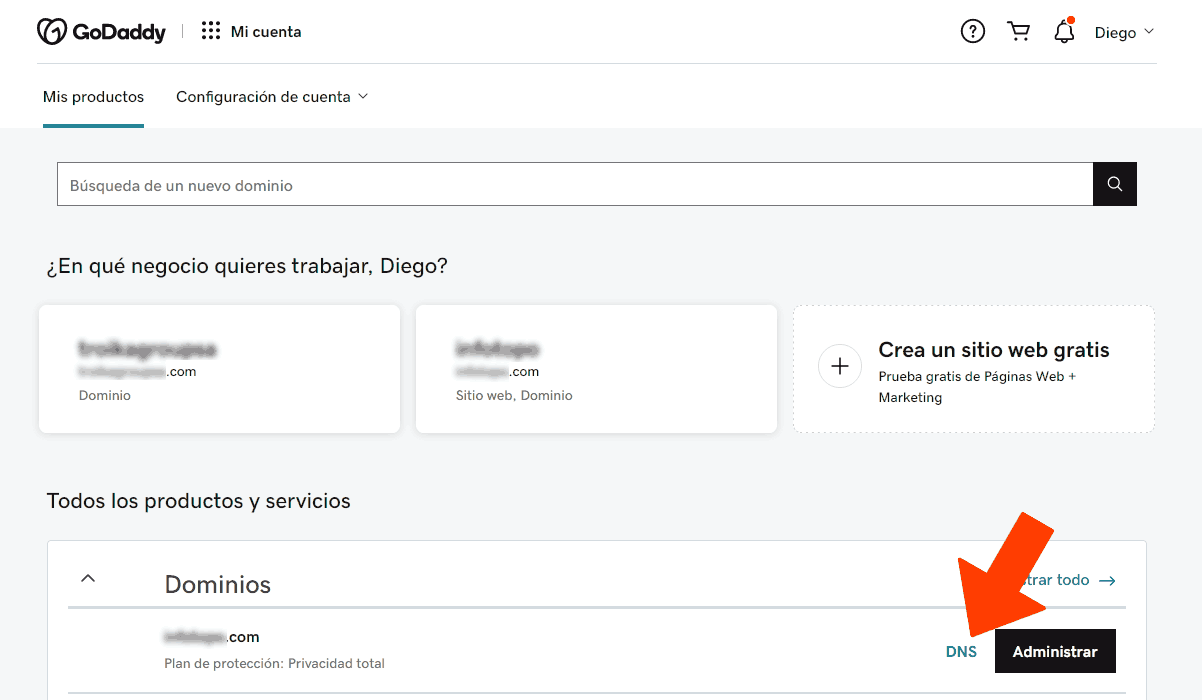
Y luego:
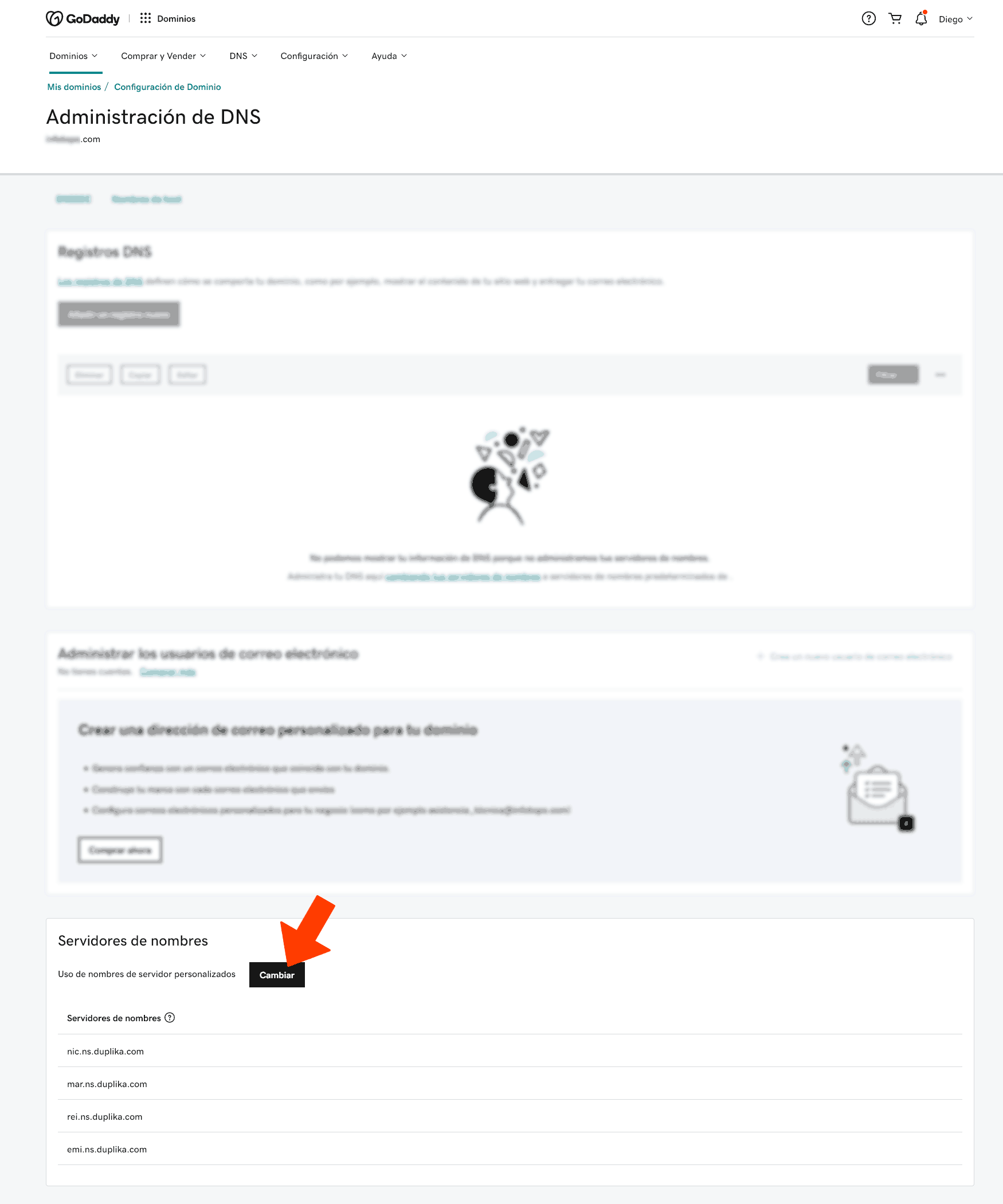
Este es sólo un ejemplo de cómo delegar los DNS dado que cada empresa registrante puede mostrar diferentes variaciones del mismo proceso.
¿Quién es el dueño de los dominios?
Cuando compramos un dominio por un canal seguro y reconocido, el dueño del dominio somos nosotros. Esto será evidente al ingresar los datos del titular registrado: la titularidad del dominio corresponde a la persona que se designa como titular, sin importar quién paga con la tarjeta de crédito. Si acudimos a una agencia o diseñador web, debemos asegurarnos de que están comprando el dominio con nuestros datos y NO con los propios. No es tan raro que una agencia de publicidad o desarrollo web realice el trámite de compra de nombre de dominio por nosotros, pero adquiriendo el dominio a SU nombre y NO al nuestro. Es antiético, está mal por donde se lo mire, pero ha sucedido y seguirá sucediendo.
¿Pero quién es el dueño de los nombres de dominios que todavía están libres?
Los dominios de Internet aún no "reclamados" no son propiedad de nadie hasta que alguien los registra.
Los nombres de dominio se arriendan esencialmente a individuos u organizaciones por un período de tiempo específico, generalmente de uno a diez años, por parte de los registradores de nombres de dominio.
Los registros de dominio son supervisados por una organización llamada ICANN (Internet Corporation for Assigned Names and Numbers). Dicha entidad especifica qué extensiones de dominio están disponibles (.com, .net, .com.ar, .es, y todo el resto numeroso de extensiones que se fueron creando con el tiempo). ICANN no gobierna el sistema, pero ayuda a coordinar cómo se proporcionan las direcciones IP para evitar repeticiones o conflictos. ICANN también es el repositorio central de direcciones IP desde el cual se proporcionan rangos a los registros regionales que, a su vez, son distribuidos a los proveedores de red.
ICANN no gestiona directamente las registraciones: los operadores de registro (registries) mantienen las bases de datos de cada extensión y los registradores (registrars) procesan los registros, mientras que IANA mantiene la base de datos de los dominios de nivel superior y sus organizaciones gestoras. Hablamos de esto más adelante en la nota.
¿Por cuanto tiempo soy dueño de un nombre de dominio?
Mientras renovemos nuestro dominio cuando su vencimiento esté próximo, seremos dueños virtualmente para siempre. La fecha de su expiración depende de la fecha del día en que lo hemos comprado y el período de tiempo por el que lo hayamos comprado. Por ejemplo, si registramos pepito.com el día 13/03/2023 por un período de 5 años, la fecha de vencimiento será el día 13/03/2028.
Al momento de comprar o renovar un dominio, podemos elegir el número de años por el cual deseamos tenerlo. Algunas empresas de registración permiten comprar un dominio por un período de hasta una década. Nic.ar de Argentina, empero, permite registrar por un año.
¿Qué pasa cuando no renuevo un nombre de dominio?
Lo perdemos. En general, tendremos un tiempo extra ("de gracia") para renovarlo que dependerá de la compañía registrante (15 días o un mes). Por su parte, Nic.ar nos cuenta sus políticas de renovación aquí.
En líneas generales, siempre podremos volver a comprarlo (si no lo hace un tercero antes). Atención, que ciertos registrantes pueden quedarse con nuestro dominio si éste les resulta de valor. La finalidad es luego venderlo por más dinero que el normal. GoDaddy es una de las empresas que suele incidir en estas prácticas cuando el nombre de dominio resulta "suculento".
Ejemplos de esto pueden pensarse en la clave "técnicodeaireacondicionado.com", "encontrarpareja.es", o cosas así, genéricas pero que resultan palabras clave interesantes para posicionar en Google/Bing. También, cuando un dominio ha estado activo por varios años, puede que GoDaddy se lo reserve durante un período para venderlo a más valor.
Cuando la venta no sucede en un tiempo prudencial, GoDaddy liberará el dominio a su valor convencional.
¿Qué quiere decir "redireccionar" un dominio?
Los dominios permiten servirse de redireccionamientos, lo que a fines prácticos quiere decir que un usuario, al escribir el nombre de nuestro dominio para entrar al sitio, será redirigido automáticamente a otro (como usuarios, a veces ni siquiera lo advertimos).
Redireccionar un nombre de dominio puede resultar útil para campañas y micrositios, o para reenviar personas a páginas especiales en su sitio principal. En un afiche publicitario, una dirección corta del tipo www.celulares.com/sorteo es más fácil de recordar que www.celulares.com/novedades/2023/galaxy/sorteo.html. Entonces, se crea una URL fácil que, al ingresarla, nos redirige automáticamente al contenido que el dueño o empresa de página realmente desea que veamos dentro de su sitio institucional principal.
También son útiles los redireccionamientos para evitar confusión con la ortografía. Por ejemplo, si visitamos www.fb.com, seremos reenviados automáticamente a www.facebook.com.
Diferentes tipos de dominios
Los dominios pueden divirse en cinco tipos con sus características específicas:
Dominios de Nivel Superior Genéricos (gTLD, 'generic Top-Level Domain')
Dominios de Nivel Superior Geográfico (ccTLD, 'country code Top-Level Domain')
Dominios de Segundo Nivel.
Dominios de Tercer Nivel.
Dominios Patrocinados (sTLD, 'sponsored Top-Level Domain')
Los dos primeros grupos de "Nivel Superior" también son llamados "de primer nivel". Aclaramos, por las dudas, que no se relaciona a la calidad sino a un ordenamiento jerárquico que en breve vamos a entender mejor.
gTLD: dominios de nivel superior genéricos
Un dominio de nivel superior es tal cual suena: un tipo de nombre de dominio que se encuentra en el primer nivel del sistema de nombres de dominio de Internet. Son nombres de dominio de común uso, es decir los más extendidos a nivel internacional. Los gTLD no se definen por un país determinado. Ejemplos clásicos: .com, .org, y .edu, pero también encontramos casos como .audio
Otros ejemplos de gTLD incluyen .mil (militar), .gov (gobierno), .org (para organizaciones sin fines de lucro e instituciones diversas) y .net, que originalmente fue diseñado para proveedores de servicios de Internet (ISP) pero que ahora se emplea de manera más amplia y flexible.
La lista oficial de gTLD es mantenida por una organización llamada Autoridad de números asignados de Internet (IANA) y la lista actualizada completa puede verse aquí. Dicho listado también incluye dominios tipo ccTLD y de tercer nivel, de los que hablaremos a continuación.
ccTLD: Dominios de nivel superior de código de país
Los ccTLD emplean sólo dos letras porque se basan en códigos de países internacionales, como .us para los Estados Unidos, .ar para Argentina o .jp para Japón. A menudo son utilizados por empresas que están creando sitios dedicados a regiones específicas. Es una excelente manera de señalar a los usuarios que el contenido que están viendo está vigente y/o es bien específico de su región.
Nombres de dominios de "Tercer Nivel"
Fácil: surgen de la combinación de los primeros dos. Es decir, por ejemplo, un .com sumado a un .ar (una extensión genérica superior sumada a una extención de código de país).
Si bien las categorías de dominio mencionadas anteriormente son las más frecuentes, existen otras variaciones "raras" con las que podemos encontrarnos.
Dominios de segundo nivel
Recurso poco popular. El mejor ejemplo de estos nombres de dominio tiene lugar en Inglaterra. Las empresas británicas ocasionalmente usan .co.uk en lugar de .com. Otro ejemplo perfecto de un dominio de segundo nivel es .gov.uk, que a menudo es utilizado por instituciones gubernamentales, mientras que .ac.uk es utilizado por instituciones académicas y universidades.
sTLD: Dominios patrocinados
Sí, así es. Un sTLD patrocinado, si bien entra dentro del grupo de los nombres de dominio de nivel superior, poseen un patrocinador que representa a una comunidad específica. Los entes sponsor pueden basarse en conceptos étnicos, geográficos, profesionales, técnicos u otros conceptos propuestos por agencias u organizaciones privadas. Éstas establecen (y hacen cumplir) reglas que restringen la elegibilidad de los registrantes para usar el sTLD.
Ejemplos de nombres de dominio tipo sTLDs son aquellos con extensiones .travel (patrocinado por Tralliance Corporation), .tel (patrocinado por .tel) o .aero (patrocinado por SITA).
¿Qué son los "Subdominios"?
Los subdominios son prefijos que se añaden a un nombre de dominio cualquiera para separar una sección de su sitio web. Ej.: clientes.miempresa.com (el subdominio en el ejemplo es "clientes").
Admins y equipos de marketing utilizan los subdominios principalmente para gestionar secciones que se beneficien de una jerarquía propia o aparte de los contenidos principales del sitio. Vale aclarar que los subdominios funcionan como un sitio web independiente de su dominio principal. Así, la distinción de "sub-dominio" permite desarrollar una sección de un sitio web sin entorpecer el sitio del dominio principal.
Los subdominios son útiles en casos bien definidos: no requieren que los webmasters adquieran un nombre de dominio adicional para crear divisiones o secciones específicas dentro de su sitio. Por ejemplo, Facebook utiliza developers.facebook.com para proporcionar información específica para desarrolladores de aplicaciones y web que pretendar usar la API de Facebook. Otro gran ejemplo es support.google.com.
Otro caso común es encontrarnos con es.empresa.com (el subdominio donde encontraremos el idioma castellano de un sitio cuyo dominio principal presenta un idioma diferente) o latam.empresa.com (en donde el subdominio presentará contenido específico para latinoamérica).
Ahora que ya sabemos todo sobre nombres de dominios, ¿por qué no adquirimos el propio?
Nos encargamos del mantenimiento de tu sitio
¡Quiero comprobar si mi dominio está libre ahora!
¿Dudas o consultas? Escríbannos! Estamos para ayudarles y asesorarles. Éxitos en sus emprendimientos, y gracias por leer.