

Cambiar URL de WordPress
Actualizado hace 2 meses
Si precisas migrar tu WordPress de lugar, ya sea porque has cambiado el dominio de tu página, o bien porque se requiere moverlo de directorio, WordPress facilita la tarea mediante algunas opciones posibles.
Cambiarlo desde tu configuración
Desde las opciones de configuración, en Ajustes > Generales podrás establecer y cambiar la URL en donde se encuentra alojado tu sitio.
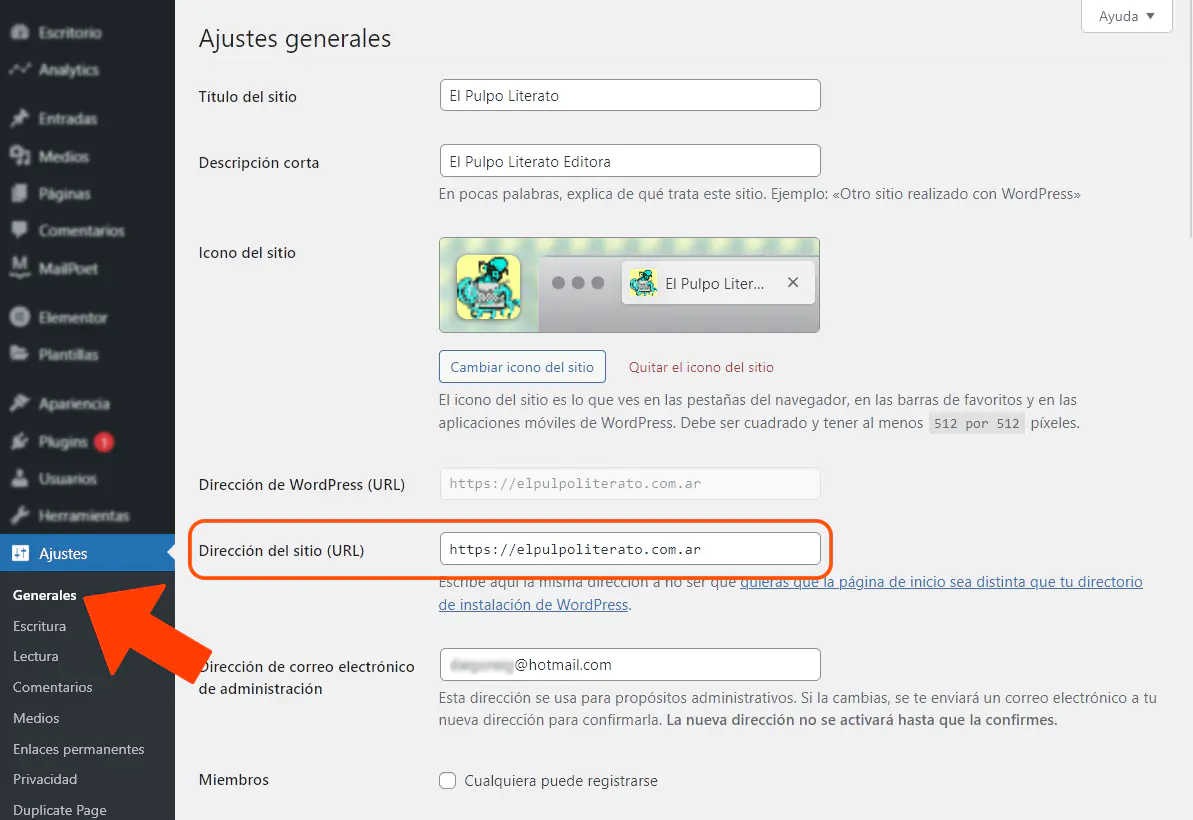
Esta acción es posible siempre y cuando puedas ingresar a tu Escritorio de WordPress.
Si no te es posible ingresar a tu WordPress Admin, ya sea porque tu sitio ya fue mudado o por cualquier otro motivo, no te preocupes: es posible escribir estos campos ("Dirección de WordPress (URL)/Dirección de sitio (URL)") editando manualmente el archivo de configuración wp-config.php
Establecer la nueva URL desde wp-config.php
Si editas el archivo wp-config.php, disponible en la raíz de tu WordPress, podrás agregar el siguiente código para determinar el valor de dichas variables.
Debes añadir el siguiente código justo arriba de /* That\'s all, stop editing! Happy blogging. */
define( 'WP_HOME', 'http://midominio.com' );
define( 'WP_SITEURL', 'http://midominio.com' );
Atención: debes reemplazar la parte que reza "midominio" en el ejemplo por el dominio, con el directorio, donde hayas movido a tu WordPress.
Cambiar URLs en la base de datos
Finalmente, si posees menciones de tu URL vieja en el contenido de tu sitio, será necesario editarlo desde la base de datos.
Existen plugins que facilitan dicha tarea, y nosotros recomendamos Better Search Replace por su simpleza y efectividad.
Busca e instala este plugin desde Plugins > Añadir nuevo como se muestra en la captura inferior, y actívalo una vez instalado.
Tras la instalación y activación del plugin, busca la nueva herramienta "Better Search Replace" dentro de la sección Herramientas de tu WordPress.
Si tu sitio está alojado con nosotros, puedes escribirnos a [email protected] detallando los datos de acceso a tu WordPress para que nos encarguemos de todo.