Detalles del Uso de Disco
Actualizado hace 2 meses
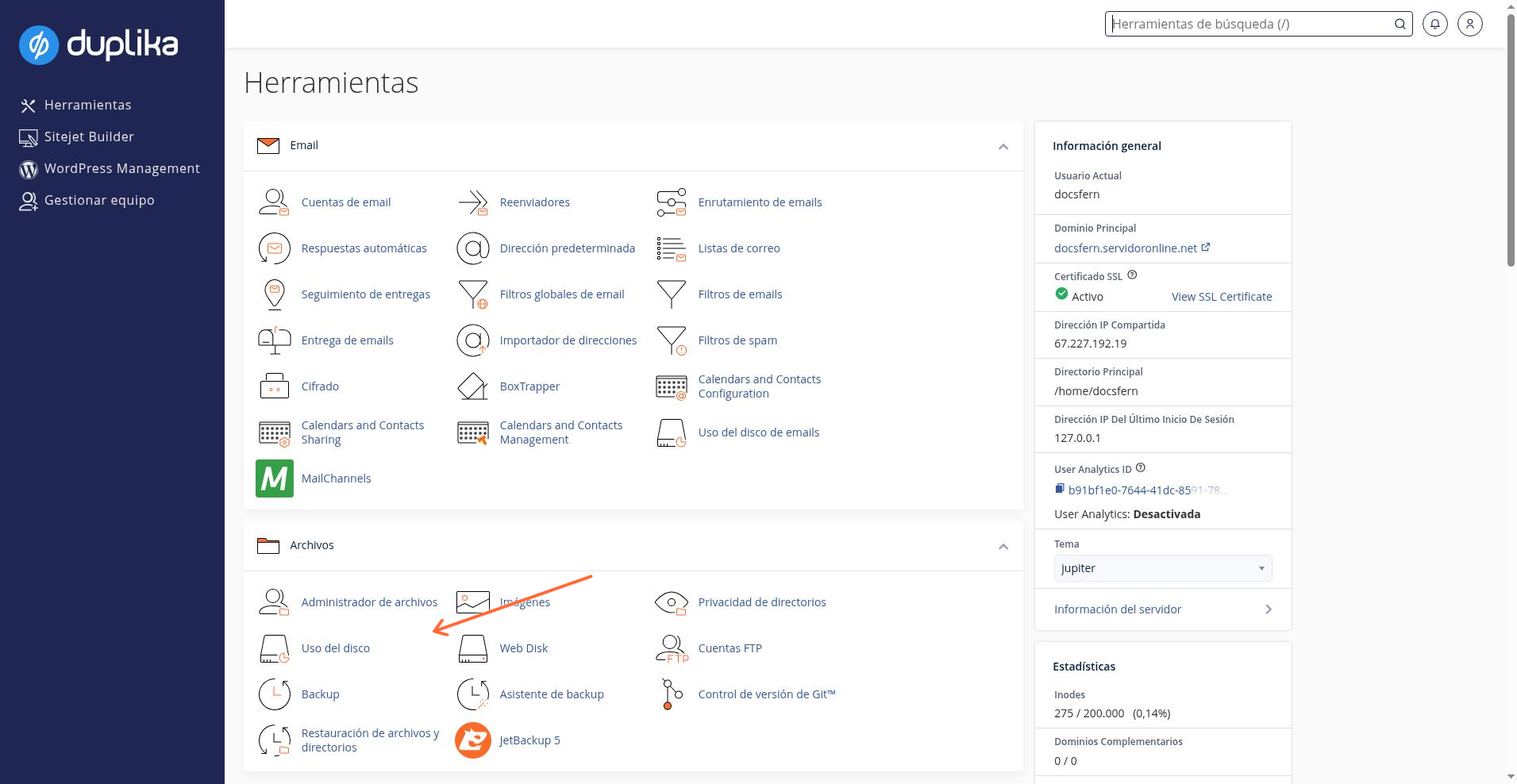
Dentro de nuestro panel de control cPanel, buscaremos, en el panel de la derecha, el enlace de nombre "Uso de Disco" como vemos en la captura inferior.
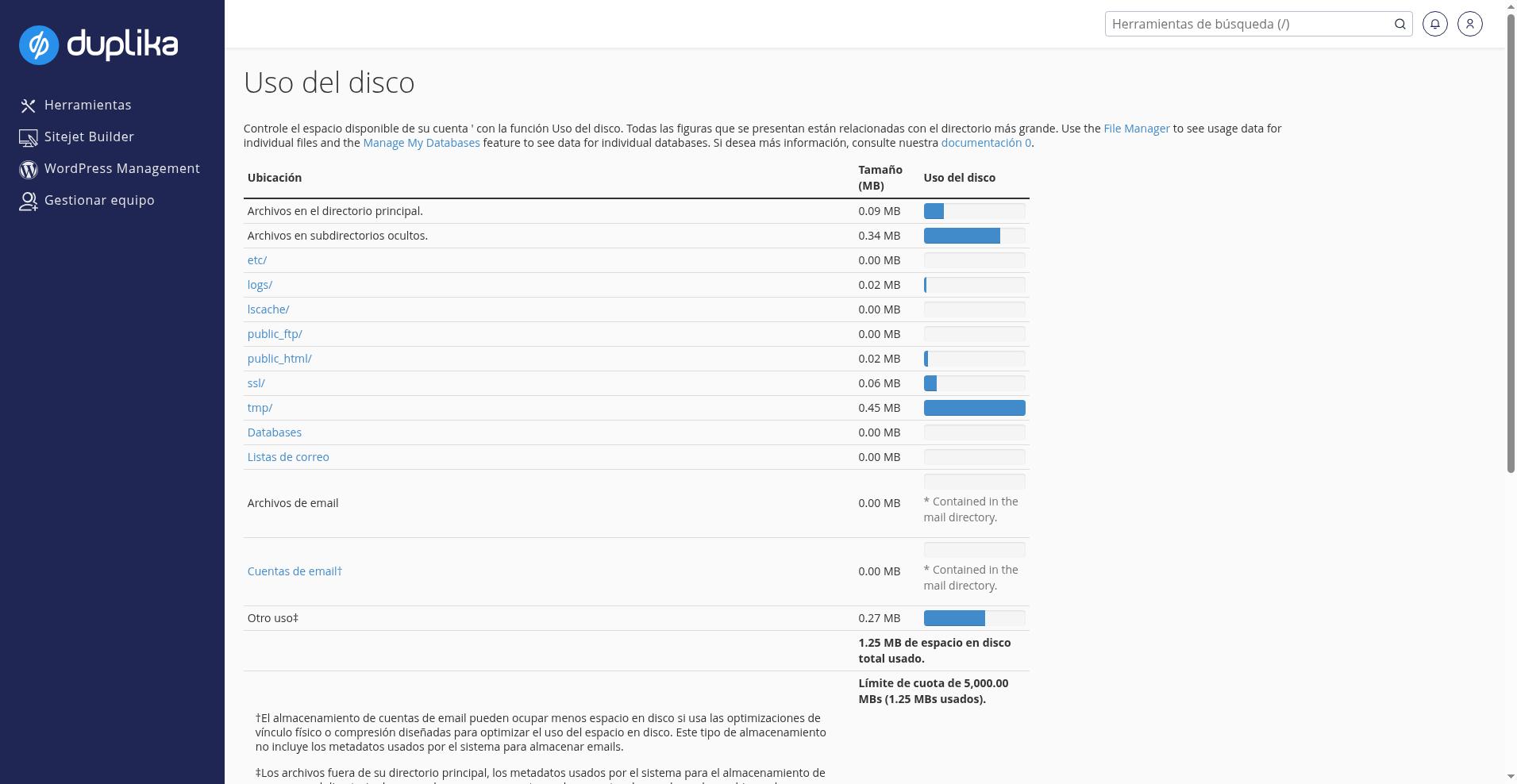
Por supuesto, la tabla y sus detalles variarán según sea el caso, pero los datos que se muestran, más allá de los números del ejemplo, son los siguientes:
Archivos en el directorio principal: Archivos sueltos que se encuentran en nuestra carpeta home
Archivos en subdirectorios ocultos: Archivos en carpetas que comienzan con un punto. Las más comunes en este caso son .cpanel, .cagefs, .cl.selector, .softaculous, .htpasswd y siempre representan carpetas del sistema (¡nuestra cuenta tendrá problemas graves si borramos estos archivos!). Nota: si nos encontramos con otras carpetas que no hemos mencionado, investigamos que no contengan contenido malicioso.
Carpeta etc.: Contiene usuarios y contraseñas de correo. Estos archivos son esenciales para que funcionen los correos vía POP3, IMAP y SMTP. Si borramos estos archicos, es posible que dejemos de ver listados los correos en cPanel, o que dejemos de recibirlos.
Carpeta logs: Contiene datos históricos sobre el acceso a Apache (sitio web) y FTP. Podemos borrar estos datos, aunque tengamos en cuenta que estos logs son irrecuperables. En caso de que nuestra cuenta tenga FPM activado, aquí también encontraremos archivos de log de errores PHP.
Carpeta public_ftp: Esta carpeta está en desuso; es la ubicación de archivos de FTP subidos por —o para— usuarios anónimos. Si el proveedor lo habilita, el acceso a esta carpeta se gestiona mediante Anonymous FTP, de modo que los usuarios anónimos puedan descargar los archivos que hayamos subido previamente sin necesitar acceso a otras áreas del sitio web. Debemos configurar los permisos explícitamente, preferentemente solo de descarga, y no brindar usuarios de FTP a extraños.
Carpeta public_html: Aquí están los archivos de nuestro sitio web (nota: si contamos con varios sitios web, es posible que veamos carpetas específicas para cada uno de ellos).
Carpeta ssl: Contiene nuestros certificados y claves privadas de SSL. No debemos compartir estos archivos con nadie, nunca. Si los eliminamos, el acceso por HTTPS dejará de funcionar.
Carpeta tmp: Contiene archivos temporales, y también es donde se guardan las estadísticas de tu cuenta.
MySQL: Sumariza el espacio ocupado por todas nuestras bases de datos
Archivos del correo electrónico: Sumariza el espacio ocupado por la carpeta mail. Esto incluye todas las cuentas de correo configuradas en cPanel, archivos que puedan haberse colocado allí, cuentas que hayamos eliminado sin borrar sus archivos (o que se dejó de detectar por borrar archivos de la carpeta etc), o bien archivos de la cuenta principal (que aparece al final del listado de correos).
Cuentas de correo electrónico: Sumariza el espacio ocupado por las cuentas de correo que cPanel puede encontrar (no incluye papeleras de reciclaje, cuentas que cPanel no detecte, ni la cuenta principal).
Otro uso: Este valor usualmente estará en cero, e indica que hay archivos afuera de nuestra carpeta home que poseen nuestro usuario y también contabilizan para nuestra cuenta. En el caso del ejemplo superior existía un archivo de backup que movimos fuera de la carpeta home para que se aumente este valor.
Debajo de esta tabla encontraremos otra con carpetas desplegables; allí podremos visualizar más detalles sobre dónde se emplea la mayor parte del espacio en disco (procuremos ordenar por "uso del disco" para una visualización más clara).