

Cómo crear un post privado en WordPress
Actualizado hace 3 meses
¿Necesitas crear una publicación privada en WordPress? A diferencia de las publicaciones públicas de WordPress, los visitantes de tu sitio web no podrán ver una publicación privada; únicamente los usuarios que inician sesión con permisos específicos podrán ver dichas publicaciones. Esto es útil para cuando aún no hemos terminado de diseñar o redactar un contenido, o para cuando su visualización debe ser posible sólo para su creador. Nota: puedes cambiar el estado de "privado" a "público" en cualquier momento, y viceversa.
En este artículo te mostraremos cómo crear fácilmente una publicación privada en WordPress.
¿Qué es una publicación privada en WordPress y cómo funciona?
Una publicación privada en WordPress no es visible para el público, si no unicamente para quienes inicien sesión con los permisos adecuados.
WordPress viene de fábrica con un sistema de funciones de usuario que asigna permisos y capacidades diferentes a usuarios según sus roles.
Cualquier usuario que tenga permiso para publicar un posteo puede escribirlo como privado y publicarlo. Éste será visible para el usuario y quienes esten autorizados a verlo según su rol asignado:
Administrador: puede crear, editar y eliminar cualquier publicación privada creada por cualquier usuario en un sitio de WordPress.
Editor: puede crear, editar y eliminar cualquier publicación privada creada por cualquier usuario.
Autor: puede crear, publicar, editar, ver y eliminar sus propias publicaciones privadas. No pueden ver publicaciones privadas creadas por otros usuarios.
Crear contenido privado
Primero necesitas crear una nueva publicación o página (o también puedes editar una publicación existente que desees que se mantenga privada).
En la pantalla de edición de tu contenido, dentro del recuadro derecho "Publicar" podrás ver el ítem "Visibilidad" de tu contenido.
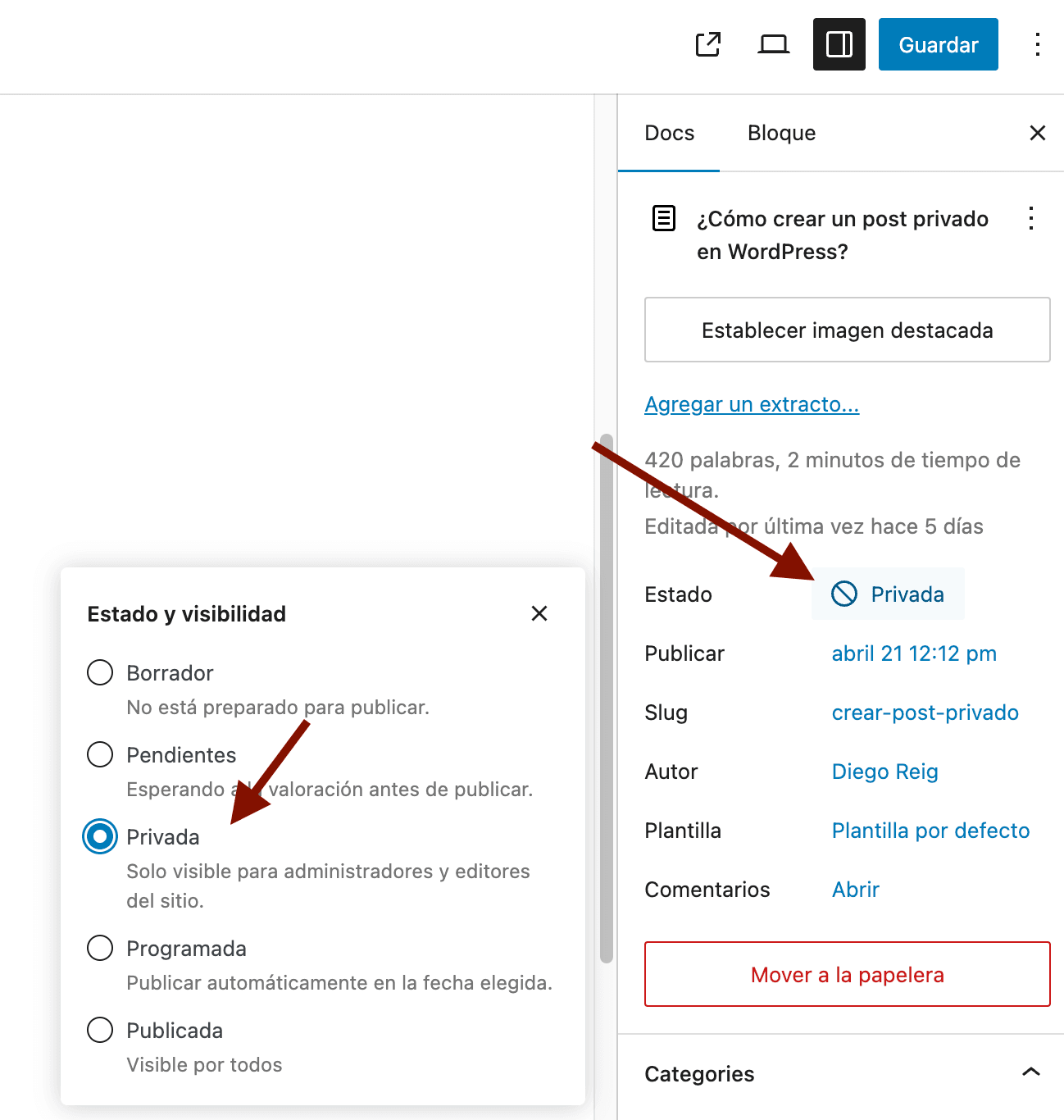
Nótese también que existe la posibilidad de proteger el contenido con contraseña.
Tras configurar tu contenido como privado (ó protegido con contraseña) podrás continuar editando tu publicación o bien guardarla.
Recuerda que puedes publicarla (volviéndola pública) en el momento en que desees.
Los usuarios que no tengan permiso para ver publicaciones privadas no verán absolutamente nada (más bien un mensaje avisando que la URL no se encuentra en el sitio).
Nota: Las imágenes que agrega a una publicación privada no son privadas, y otros autores/editores podrán encontrarlas dentro de la biblioteca de medios.
Nota adicional: dichas imágenes también podrán ser vistas por cualquier persona que conozca la URL de dicha imagen. Ej.: www.misitio.com/wp-content/uploads/2020/imagen.jpg
Esperamos que este artículo te haya permitido aprender cómo crear una publicación privada en WordPress.