

Como activar el acceso seguro SSL en WordPress
Actualizado el mes pasado
Todos nuestros planes de hosting incluyen gratuitamente un certificado SSL de Let's Encrypt. Este certificado HTTPS es instalado y renovado automáticamente en todos los dominios que apunten a nuestros DNS y tengan ya su cuenta creada en Duplika.
Con el certificado SSL preinstalado por defecto, sólo falta que configures tu WordPress para que tu URL pueda utilizarlo.
La opción mas sencilla para aprovechar tu certificado SSL es acudir a Ajustes > Generales, y completar la dirección de tu sitio pero escribiendo 'https' (ej.: https://duplika.com).
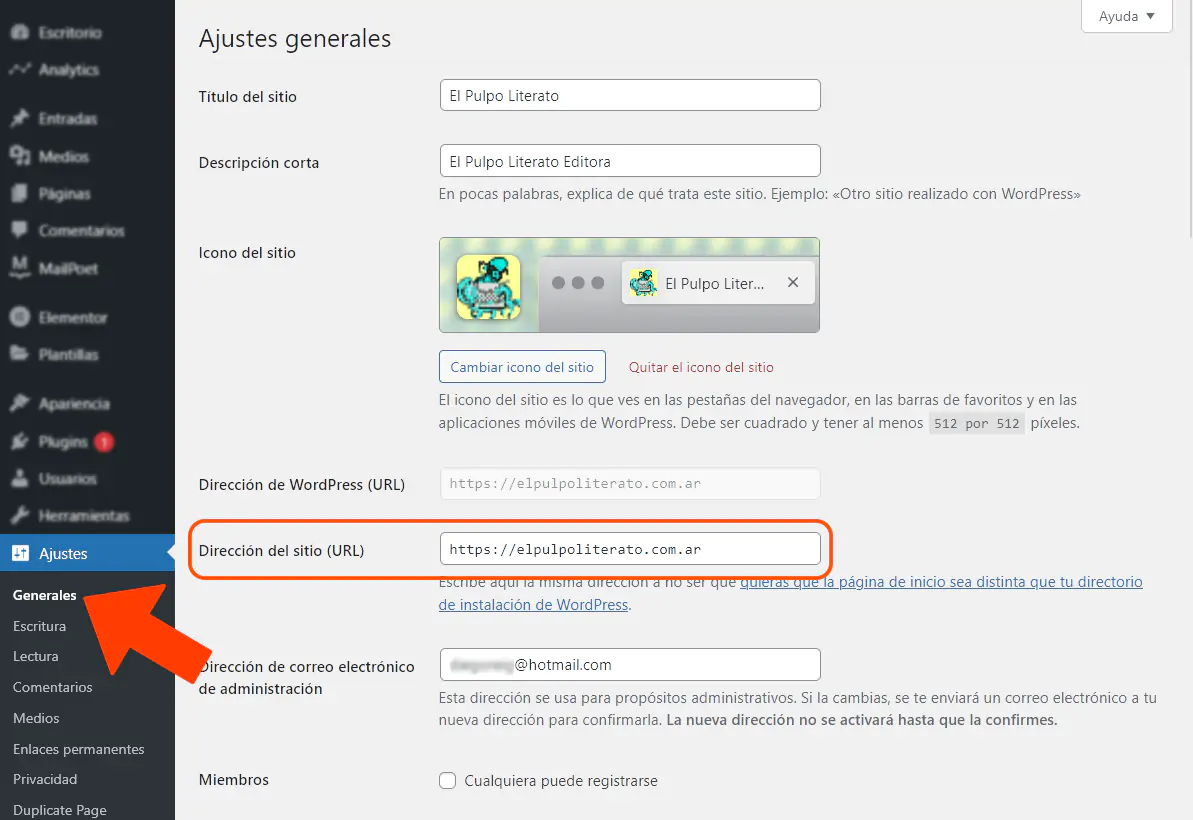
Realizado este paso, si deseas redireccionar el tráfico HTTP a la nueva versión HTTPS, debes editar el archivo .htaccess situado en la raíz de tu sitio y agregar, justo arriba de BEGIN WordPress:
RewriteCond %{HTTPS} !=on
RewriteRule ^(.*)$ https://%{HTTP_HOST}%{REQUEST_URI} [L,R=301,NE]
Tras esta modificación, tu sitio ya funcionará sobre el acceso seguro vía https.
Si no sabes cómo —o prefieres no— editar el archivo .htaccess, puedes ponerte en contacto con nosotros y nos encargamos de hacer el cambio.
Si tu sitio está alojado en otra empresa, otra opción es usar el plugin Really Simple Security (antes Really Simple SSL). Sin embargo, no recomendamos sobrecargar WordPress para una función que podemos implementar sin necesidad de sumar otro adicional más a nuestro sitio.