

Improvements to Email and Anti-Spam Services
We have activated two email services on all our shared hosting plans to help fight spam and reduce the number of related issues affecting your email.
On the one hand, we use the MailChannels relay system, which helps us improve the scanning of outgoing email to prevent hackers from accessing your email account and damaging your domain’s reputation by sending spam.
In addition to spam protection, this service helps prevent blocks by RBL-type blacklists by routing your messages through multiple servers, as cloud services do (Amazon SES, Mailchimp, Maildrill). All emails benefit from this service free of charge, helping ensure they reach more recipients safely.
When it notifies us of a change in the reputation or volume of emails sent from your domain, our operators manually review each case and will notify you automatically, either by mitigating the problem or asking you to check your emails, as appropriate. Although this is uncommon, false positives can occur depending on the type of emails you send and various patterns that are considered normal. If our anti-spam system blocks your email, we recommend checking this guide about email blocks: Email bounce – Message blocked.
In addition to this service, we have added MailScanner's anti-spam service for all incoming email to the server. It provides detailed control and transparency over the antivirus and anti-spam system, as well as options for controlling what happens to deleted emails.
If you are already a customer and would like to learn more about how MailScanner works and how to configure it, you can send us a ticket and we'll be happy to help.
Although both services prevent incoming and outgoing spam attacks, it's important to keep your accounts secure so that hackers cannot gain unauthorized access to them.
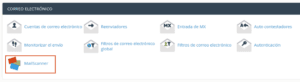
Access MailScanner from your cPanel
We'd like to take this opportunity to remind you of some basic email security measures:
It's important to use a mix of letters, numbers, and symbols in your passwords. For example, Zap4to@2018 would be a secure password; however, you could make it even more secure by avoiding dictionary words and numbers associated with the current year, a phone number, or an ID number that someone who knows your personal information could easily guess.
Make sure that all the devices you use have antivirus software installed (if you have Windows 10, it comes with antivirus software by default), and ideally, an anti-malware service as well. Some options we recommend are SpywareBlaster, SpyBot Search & Destroy, and Malwarebytes.
Avoid using your email on public networks, such as in cyber cafés or public squares. If you do access it this way, always use the secure TLS mode in your email client or HTTPS for webmail.