

Mejorar el envio de correos desde WordPress usando SMTP
Actualizado el mes pasado
Un problema bastante común en WordPress es que, por distintos motivos que repasaremos en esta nota, los correos enviados desde la plataforma son filtrados como spam automáticamente. En esta breve nota explicamos el problema y aportamos la solución indicada para que esto no suceda más.
¿Por qué los mails son filtrados?
Los mails que envía WordPress suelen no tener formato: son generados vía PHPmail, y, por defecto, el remitente no está definido: WordPress usa [email protected] (el dominio de tu sitio). La dirección real puede variar según los plugins y la configuración del servidor.
Esto hace que los filtros de muchos proveedores de mail —como Gmail o Outlook— filtren los correos de forma automática, ya que un remitente similar es un indicador de posible spam.
Enviar mails de WordPress vía SMTP
Si configuramos WordPress para que utilice una cuenta de SMTP —en lugar de phpmail para el envío de correos—, esta acción ayudará a que los proveedores mejoren la puntuación en sus filtros. Esto brinda mayor credibilidad a nuestros envíos, reduciendo las posibilidades de que nuestros correos sean filtrados.
Existen numerosos plugins que favorecen esto. Nosotros recomendamos FluentSMTP. ¿Por qué? Porque la configuración es muy sencilla y podemos realizarla con los datos del SMTP que estemos utilizando.
Si tu sitio está alojado con nosotros, bastará con que nos envíes un ticket de soporte para que nos encarguemos de configurarlo.
Configuración de FluentSMTP
Al instalar el plugin, debemos agregar una conexión de mails, elegimos Other SMTP:

Luego nos dirigimos a la configuración de SMTP. Allí utilizaremos una cuenta de mail de nuestro dominio previamente creada.
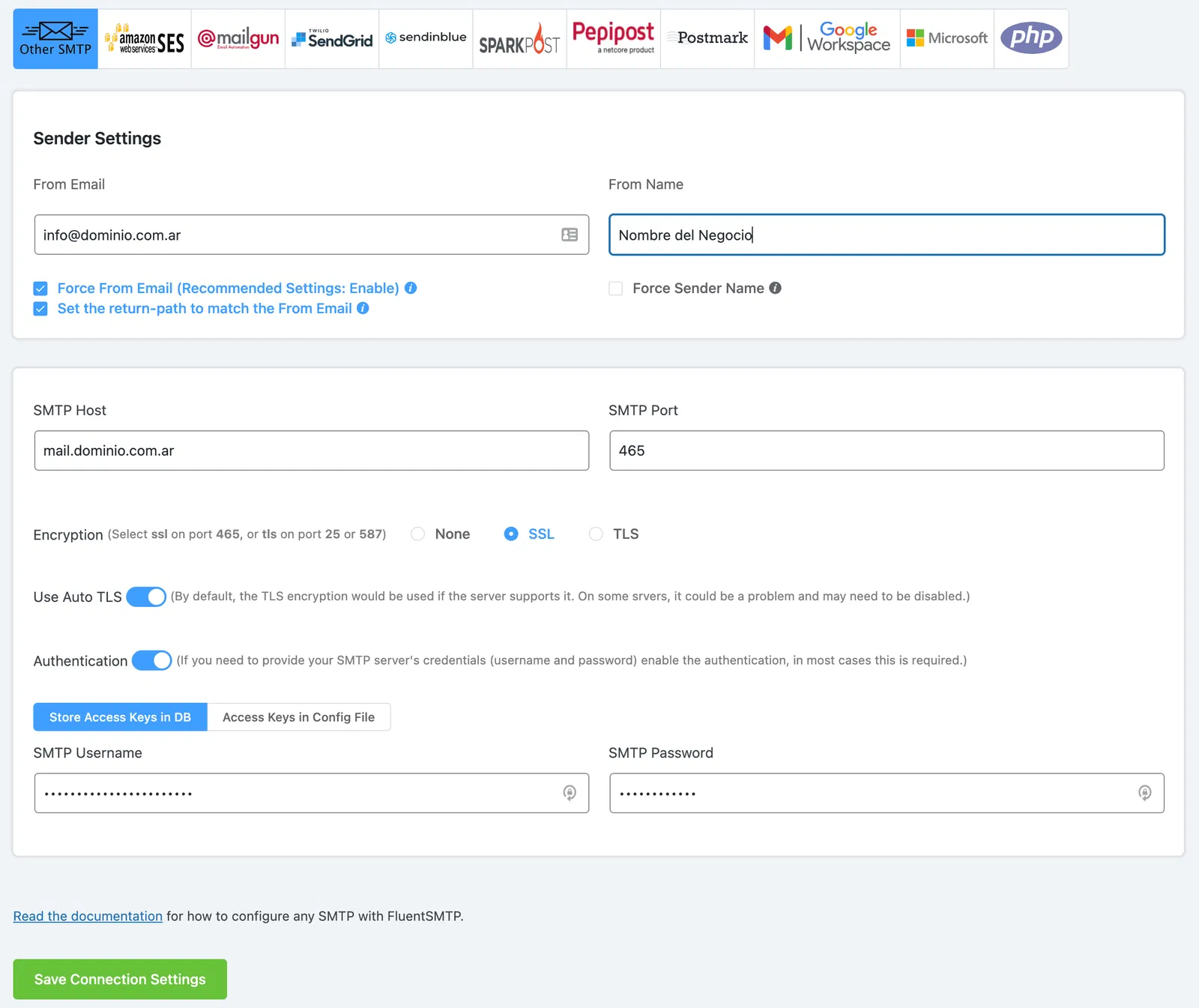
Activamos SSL y Authentication para validar nuestros envíos.