

Qué es el hosting: para qué sirve y qué tipos existen
Actualizado hace 4 semanas
El hosting, también llamado alojamiento web, es el servicio que permite almacenar los archivos, imágenes, bases de datos y demás contenidos de un sitio web en un servidor conectado permanentemente a Internet.
En términos simples: si el dominio es la dirección de tu sitio, el hosting es el lugar donde vive su contenido.
Cuando una persona escribe tu dominio en el navegador, el servidor de hosting recibe la solicitud y entrega los archivos necesarios para mostrar la página.
Por eso, para publicar un sitio web necesitás dos elementos fundamentales: un dominio, que identifica la dirección del sitio, y un servicio de hosting, que almacena y sirve su contenido.
¿Para qué sirve el hosting?
El hosting sirve para que un sitio web pueda estar disponible en Internet.
Cuando contratás un servicio de hosting obtenés espacio y recursos dentro de un servidor para almacenar los archivos de tu sitio, bases de datos, correos y otros componentes necesarios para su funcionamiento.
Sin hosting, los archivos de tu web podrían existir en tu computadora, pero nadie podría acceder a ellos mediante Internet.
Un buen servicio de hosting también aporta recursos relacionados con rendimiento, seguridad, copias de respaldo, administración y soporte técnico.
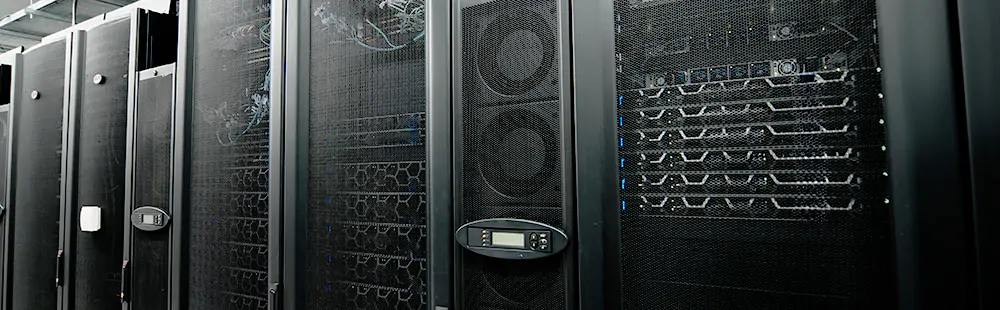
Servidores físicos ubicados en el datacenter. Allí se alojan los archivos de los sitios web, que se entregan ("sirven") a los usuarios (visitantes de un sitio) a través del servicio de hosting.
¿Cómo funciona el hosting?
Cuando alguien visita un sitio web, su navegador se conecta al servidor donde está alojado y solicita los archivos necesarios para mostrar la página.
El servidor procesa la solicitud y entrega HTML, imágenes, hojas de estilo, scripts y datos al dispositivo del visitante.
Todo esto ocurre normalmente en una fracción de segundo. Por eso, la velocidad del servidor, su conectividad, el almacenamiento y la configuración del hosting influyen directamente en el rendimiento de un sitio web.
Los servidores profesionales funcionan dentro de centros de datos preparados con conectividad redundante, energía de respaldo, refrigeración y medidas de seguridad física y digital.

Racks repletos de servidores web, siempre en ambientes refrigerados e ignífugos.
El hosting web es un servicio ofrecido por empresas especializadas que proporcionan espacio en servidores para almacenar y publicar sitios en Internet. Estos servidores —computadoras de alto rendimiento ubicadas en centros de datos— funcionan en ambientes controlados, con refrigeración constante, energía estabilizada y estrictas medidas de seguridad física.
Además del entorno físico, estos centros cuentan con conectividad permanente a Internet mediante enlaces redundantes de alta velocidad, posibilitando que los sitios web almacenados estén accesibles desde cualquier lugar del mundo, las 24 horas y 365 días del año.
Todo este conjunto de recursos —infraestructura, conectividad y control ambiental— es lo que garantiza la estabilidad, velocidad y disponibilidad continua de los sitios alojados.
¿Cómo es el hardware de un servicio de hosting?
El hardware del servidor cumple un rol fundamental en la velocidad y estabilidad del hosting. Componentes como la CPU determinan cuántas visitas simultáneas puede manejar un sitio sin degradar su rendimiento. En nuestros servidores, por ejemplo, utilizamos procesadores de alta gama como AMD EPYC e Intel Xeon Gold, diseñados específicamente para cargas web exigentes.
https://www.youtube.com/watch?v=hR6eu06IzeU
¿Cuál es la diferencia entre dominio y hosting?
El dominio y el hosting cumplen funciones diferentes pero trabajan juntos.
El dominio es la dirección que una persona escribe para acceder al sitio, por ejemplo duplika.com.
El hosting es el servicio que almacena los archivos y datos del sitio y los entrega cuando alguien visita esa dirección.
Podés imaginarlo de esta manera: el dominio es la dirección de una casa y el hosting es la casa y el espacio donde guardás todo su contenido.
Podés registrar un dominio con una empresa y contratar el hosting con otra; ambos se conectan mediante la configuración DNS.
Qué sucede cuando escribimos una dirección web
Cuando escribes una dirección web en la barra del navegador —por ejemplo, duplika.com— se traduce en que ingresas una URL (de las siglas Uniform Resource Locator, es decir, el identificador único que permite localizar un sitio en Internet).
Esa URL actúa como una especie de coordenada digital: le indica al navegador a qué servidor debe conectarse para obtener el contenido solicitado. Entonces, tu dispositivo (ya sea una computadora, celular o smart TV) envía una solicitud al servidor web donde está alojado el sitio, y éste responde enviando los archivos necesarios para que puedas ver la página en pantalla: texto, imágenes, hojas de estilo, scripts para funcionalidades especiales, etc.
Este intercambio ocurre en milisegundos. Mientras los archivos se descargan, el navegador empieza a renderizar —juntar y acomodar correctamente todos los elementos en pantalla— lo que se traduce en una carga y compilado progresivo de la página web visitada. Si el servidor es eficiente, y el sitio está bien optimizado, todo el contenido puede mostrarse en menos de dos segundos.

Ahora bien, detrás de esa dirección web y su carga rápida, hay una infraestructura invisible pero crucial: el servicio de hosting. Cada proyecto online tiene necesidades particulares —no es lo mismo una tienda en línea con miles de visitas que un blog personal—, por lo que no existe una solución única.
Una empresa de hosting profesional y transparente debería ayudarte a elegir un plan que se ajuste al perfil técnico de tu sitio: necesidad real de recursos, hardware acorde al volumen de tráfico, mantener las actualizaciones y otros factores clave que mejoran la experiencia de navegación del usuario en tu web.
Y. amén del servicio en sí, también es importante contar con herramientas que faciliten la gestión diaria del sitio.
Por eso, y para facilitar la vida del cliente, Duplika incluye el poderoso cPanel en todos sus planes de hosting. Esta herramienta de administración brinda al cliente control total sobre su sitio web, cuentas de correo, copias de seguridad y muchas otras funcionalidades esenciales en pos de gestionar el hosting de manera rápida, simple y eficiente.
Espacio web en tu hosting
Mencionamos que el hosting implica un espacio en disco como su característica sine cua non. No es casual: hosting significa literalmente “alojamiento”, es decir, el lugar físico donde se almacenan los archivos de tu sitio web.
Este espacio de almacenamiento, como tal, puede estar basado en dos grandes tecnologías: los discos HDD (de platos que giran mecánicamente) y los modernos discos SSD (estado sólido). ¿En qué se diferencian y por qué es importante esto en materia de velocidad?
¿Qué diferencia hay entre hosting HDD, SSD y NVMe?
Los servidores pueden utilizar diferentes tecnologías de almacenamiento.
HDD utiliza discos mecánicos y es la tecnología tradicional. Ofrece gran capacidad a bajo costo, pero tiene tiempos de acceso más altos.
SSD utiliza memoria de estado sólido, sin partes móviles, y permite acceder a los archivos mucho más rápido.
NVMe es una tecnología de almacenamiento de estado sólido diseñada para aprovechar conexiones de mayor velocidad y reducir todavía más la latencia.
Para un sitio web moderno, SSD o NVMe ofrecen una ventaja clara en velocidad y capacidad de respuesta frente a un disco HDD tradicional.
Nuestros planes de hosting utilizan almacenamiento de estado sólido de alto rendimiento, incluyendo NVMe según el servicio contratado.
Evolución en el almacenamiento de datos
Para entenderlo, imagina un disco de pasta: el tocadiscos gira, la púa lee los surcos de manera secuencial y esto reproduce la música. Ese mecanismo, en esencia, es similar al funcionamiento de un disco HDD: platos físicos que giran a gran velocidad mientras un cabezal se mueve para leer (o escribir) datos.
En cambio, un disco SSD no tiene partes móviles. Es más parecido a un pendrive ultrarrápido: accede directamente a los datos en chips de memoria, lo que lo hace muchísimo más veloz, más silencioso y más resistente al desgaste que un HDD tradicional.
En el contexto del hosting, esto se traduce en sitios que cargan más rápido, menor tiempo de respuesta y una mejor experiencia para los visitantes. Es por eso que en Duplika trabajamos exclusivamente con discos SSD en todos nuestros planes.
El hosting HDD es aún un sistema muy arraigado por ser antecesor (y mucho más accesible económicamente) que el SSD. Pero cada generación de SSD supera a la anterior con creces, y así la distancia entre ambas tecnologías es a duras penas comparable.
Enseguida identificamos un disco mécanico HDD en una computadora de escritorio porque hace ruido al leer o escribir datos: un leve runrún mecánico, como si pequeños granos de arroz chocaran entre sí. El SSD es mudo.
El hosting con discos HDD representa el sistema de almacenamiento tradicional. Su principal ventaja sigue siendo el bajo costo, lo que lo convierte en una opción accesible para quienes priorizan el presupuesto por sobre el rendimiento. Pero, si bien existen versiones modernas que han mejorado la velocidad de rotación para optimizar el desempeño, la tecnología HDD enfrenta un límite físico insalvable: al depender de piezas mecánicas en movimiento —como motores y cabezales— no puede competir en velocidad ni durabilidad con los sistemas SSD actuales.
El relativamente nuevo hosting SSD se diferencia del Hosting con HDD como el día de la noche: el primero emplea discos de “estado sólido”, plaquetas que carecen de motores o discos que giran. En SSD no hay partes móviles: todo funciona como una gran memoria electrónica. De esto se entiende que no genere ruido, se beneficie de una vida útil más prolongada y —nada menor— puedan acceder a múltiples archivos al mismo tiempo —igual que la memoria RAM.
A fines prácticos, la diferencia entre HDD y SSD es comparable a esto:
→ Con un HDD, para comer un sándwich hay que levantarse del sillón y caminar hacia la cocina, abrir la heladera y buscar los ingredientes de a uno.
→ Con un SSD, en un segundo volamos a la heladera, recogemos todos los ingredientes al mismo tiempo y disponemos de un sándwich habiendo tardado un 10% del tiempo en relación con el ejemplo anterior.
Así de diferentes son estas dos tecnologías.
Por supuesto, el salto evolutivo tiene su precio. Almacenar la misma cantidad de información en un SSD cuesta, en promedio, el doble que en un HDD por mega-byte de espacio.
Por eso, la mayoría de los proveedores de hosting todavía no ofrecen discos de estado sólido en sus planes. En Duplika, en cambio, trabajamos exclusivamente con SSDs en todos nuestros servicios.
Tipos de Hosting
Existen diferentes tipos de servicios de hosting, y por eso la elección ideal dependerá de las características y necesidades de tu proyecto.
Hosting compartido
Es el tipo de hosting más común y económico. Varios sitios web conviven dentro del mismo servidor físico, compartiendo recursos como CPU, memoria y ancho de banda. Si el servidor está bien configurado, y el sitio bien optimizado, es una excelente opción para arrancar un proyecto.
En estos entornos, es fundamental que el proveedor utilice tecnologías como CloudLinux (como hacemos nosotros). Cloudlinux aísla cada cuenta para evitar que un mal funcionamiento de una cuenta —incluyendo infecciones— afecte a los demás sitios del servidor.
Planes multicuenta / Reseller
Los planes de hosting reseller permiten crear y administrar varias cuentas de hosting independientes desde una misma plataforma. Es especialmente útil para agencias, desarrolladores y profesionales que administran sitios de diferentes clientes.
VPS y servidores Cloud
Un servidor VPS utiliza virtualización, usualmente KVM o VMWare, para asignar recursos y configuraciones independientes dentro de una infraestructura de servidor. Ofrece más control, escalabilidad y capacidad que un plan de hosting compartido.
Servidores dedicados
A diferencia del cloud, acá el servidor físico completo está reservado exclusivamente para el cliente, sin capas de virtualización. Es la opción más potente y personalizable, pensada para proyectos de gran escala o con necesidades técnicas muy específicas.
¿Qué es el "Hosting WordPress"?
El hosting para WordPress surge para acompañar la enorme popularidad de este gestor de contenidos, que impulsa nada menos que el 43,4 % de todos los sitios web del mundo (según datos de W3Techs). WordPress es un software para crear y administrar sitios, y como todo software necesita un entorno de hardware y configuraciones técnicas adecuadas.
En ese contexto, el hosting WordPress es un servicio de alojamiento optimizado específicamente para sitios construidos con WordPress. Esto implica disponer de memoria, capacidad de procesamiento y conectividad suficientes, junto con una plataforma de software ajustada para que el sitio funcione con la máxima velocidad, seguridad y capacidad de respuesta.
¿Qué tener en cuenta al elegir un servicio de hosting?
Antes de contratar un hosting, revisá especialmente:
Rendimiento: tipo de almacenamiento, CPU, memoria y tecnología del servidor.
Disponibilidad: buscá un proveedor que publique claramente su compromiso de uptime.
Soporte técnico: asegurate de poder contactar a personas que puedan ayudarte cuando exista un problema real.
Backups: verificá cómo se realizan y durante cuánto tiempo se conservan.
Seguridad: firewall, aislamiento de cuentas, protección contra malware y actualizaciones.
Escalabilidad: debería ser posible aumentar recursos o cambiar de plan sin tener que reconstruir todo el sitio.
Transparencia: revisá límites, precio de renovación y recursos incluidos antes de contratar.