


Cloudflare is a platform that helps protect and speed up websites. In its most common use, it sits between your visitors and the server hosting your website: it can deliver stored content and filter requests before they reach your hosting server.1
For a business website, blog or online store, that can mean less work for your server and a better experience for visitors. The results depend on the problem you want to solve and how you configure it.
Think about an online store: showing the same product photo to a hundred people is a repeated task. Calculating shipping for an order is a task specific to that customer. Cloudflare can help with both, but it should not treat them in the same way.
Does Cloudflare replace your hosting or domain?
For a WordPress site hosted with a provider, enabling Cloudflare does not change where its files, orders or database are stored. Your hosting server still does that work.
| Service | What it does | Example |
|---|---|---|
| Domain | The name people type to find you. | mystore.com |
| Hosting | Stores your website and runs the application. | The server running WordPress. |
| DNS | Identifies the servers that handle services for your domain. | Where your website and email are located. |
| Cloudflare | Can manage DNS and act as an intermediary to accelerate and protect web traffic. | Delivering an image from its network and filtering a suspicious request. |
Cloudflare also has products for hosting websites and building applications. Those are separate services: connecting an existing website to its CDN, the network that distributes content, does not move WordPress hosting to Cloudflare.2
If these concepts are new to you, start with our explanations of what a domain is and what web hosting is.
How Cloudflare works when someone visits your website
Imagine you publish a furniture catalogue. Someone opens a table’s product page, and their browser requests several elements: text, photos and the files that define the design.
With Cloudflare’s proxy enabled, those requests pass through its network first. If it has a valid copy of a resource that can be served from cache, it uses that copy. When it needs a response from your hosting server, it asks that server and passes the response back to the visitor.3
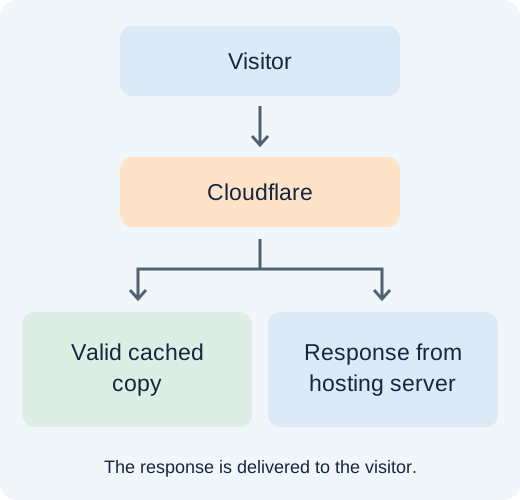
The technical term for this intermediary is a reverse proxy. You do not need to memorise it, but it helps explain how Cloudflare can influence performance and access controls.
What Cloudflare does: four useful functions
1. Deliver content through a distributed network
A CDN is a network of servers in different locations. It can deliver certain resources from a network location close to a visitor rather than requesting them from the original server every time.2
The product photos in our catalogue are good candidates: many people need to see the same files. Reusing copies reduces the requests and data transfers your hosting server needs to handle.
Delivering a page faster and generating it faster are different things. If a plugin takes a long time to calculate a quote, Cloudflare does not fix that code. That delay also needs attention in WordPress or on the server.
2. Filter attacks and suspicious requests
A DDoS attack tries to overwhelm a service with a large volume of traffic. Cloudflare has automated systems to detect and mitigate these attacks, including on its free plan.5
Its web application firewall, or WAF, can also detect attack patterns in requests. The available rules and configuration options depend on your plan.6
This adds a layer of protection, but it does not replace updates, strong passwords or backups. Nor does it guarantee every attack will be blocked. The proxy protects traffic passing through it; direct access to your server should be reviewed with your hosting provider.
3. Manage your domain’s DNS
DNS tells other systems where to find each service for your domain. Your website can be hosted with one company while your email is handled by another.
In the most common setup, Cloudflare manages those records. You can then change your website’s destination or maintain email records in one dashboard.3
Changing DNS does not transfer your domain. You can keep it registered where it is and continue using the same hosting provider.
4. Help configure HTTPS connections
HTTPS encrypts communications so data does not travel as readable text between the connected parties. When Cloudflare acts as a proxy, there are two connections: one between the visitor and Cloudflare, and another between Cloudflare and your hosting server.
Both connections matter. Cloudflare recommends Full (strict) wherever possible. This mode also encrypts the connection to your server and validates its certificate. Your hosting server must present a valid certificate for that domain.7
Seeing HTTPS in a browser is not enough to tell how the second connection is protected. If a certificate error appears, investigate its cause before selecting a less restrictive option simply to hide it.
Orange cloud and grey cloud: an important difference
For some DNS records, Cloudflare’s dashboard lets you choose whether to use its proxy:
| Status | What happens to web traffic |
|---|---|
| Orange cloud: Proxied | Passes through Cloudflare and can use its caching, filtering and optimisation features. |
| Grey cloud: DNS only | Cloudflare answers the DNS query, but the web connection goes directly to the configured destination. |
A domain can therefore use Cloudflare DNS without its website passing through the proxy. Creating an account or changing nameservers does not, by itself, prove the CDN is handling your traffic.8
You should not turn every record orange. Hostnames used to connect email services need different treatment, which we cover below.
Is Cloudflare free? When do you need a paid plan?
Yes. Cloudflare offers a free plan with CDN features, a certificate for visitor connections and DDoS mitigation. A free managed WAF ruleset is also available, with narrower coverage than the rulesets offered on higher plans.9, 6
It can be a good starting point for a business website, blog or online store. Running a business does not, by itself, require a Pro subscription.
Consider a paid plan when you need a specific feature, such as broader security rules, particular optimisations or more configuration options. Some additional products are billed separately, so check what each option includes in the official plan comparison.
Identify the problem before paying. A website slowed down by enormous images still needs those images fixed, even when it uses Cloudflare.
Cloudflare for WordPress and WooCommerce: benefits and precautions
You can use the basic integration with WordPress without installing a Cloudflare plugin. Its proxy is configured outside your website editor.
Plugins can help coordinate tasks such as clearing the cache after publishing changes. There are also specific features such as APO, a WordPress optimisation service that extends caching on Cloudflare’s network and requires its official plugin to get started.10
For a store, the priority is ensuring each customer receives the right information. A table’s photo may be identical for everyone; each person’s cart, shipping calculation and order are not.
If you configure full-page caching, review exclusions for the cart, checkout, customer account and sessions. A blanket rule to cache everything can cause login failures or responses that do not match the current user.11
After any adjustment, run a practical test: open the store while logged out, add a product, calculate shipping, apply a coupon if you use them and complete a test purchase. Checking the homepage is only the first step.
What to check before enabling Cloudflare
The usual setup involves adding your domain, reviewing its records and changing its nameservers to those assigned by Cloudflare. The initial scan helps, but it is not guaranteed to discover all existing records.12
Before confirming the change, check these points:
- Save your existing DNS configuration. Include your website, email and any subdomains you use.
- Check email records. Keep the MX records and SPF, DKIM and DMARC authentication records specified by your provider.
- Choose which hostnames use the proxy. Your website and mail server may need different settings.
- Review HTTPS and DNSSEC. DNSSEC helps verify the authenticity of DNS responses. If it is already enabled, follow the migration procedure so validation does not keep pointing to the previous configuration.
- Test the functions that matter. Alongside browsing, check forms, logins, email sending and purchases.
Update times depend on DNS caches and the previous configuration. One exact timeframe cannot be promised for every visitor.
If your domain connects several services and you do not know what each record does, ask your provider for help before making the change. Reviewing the list while everything works is easier than reconstructing it after an interruption.
Frequently asked questions about Cloudflare
Can Cloudflare stop my email from working?
An incorrect DNS change can. MX records specify where to receive email, and hostnames used for SMTP, IMAP or POP3 must resolve to the correct destination without passing through Cloudflare's standard web proxy. If you use mail.yourdomain.com for those services, it should normally be set to DNS only.13
Cloudflare also offers specific email products. Enabling its CDN does not automatically move your mailboxes to those products.
Will my website become faster as soon as I enable it?
It may improve, but there is no universal percentage. Results depend on content that can be reused, where visitors are located and how long your server takes to respond.
Compare the same pages and tasks before and after. For a store, completing checkout matters as much as opening a product page. If you want to improve WordPress performance, follow our optimisation guide.
Does Cloudflare improve Google rankings?
It does not guarantee better positions. It can contribute to a faster, more available website, but it does not replace useful content, clear structure or a site Google can crawl. When configuring security, check that rules do not block legitimate access.
Why does it ask me to verify that I am human?
This is a security check. It does not necessarily mean you have done anything wrong: browser settings, extensions or signals from your connection can cause the check to repeat.
If you cannot continue, try an updated browser and another connection. If the issue persists, contact the website administrator with a screenshot and any error code or Ray ID displayed. That identifier helps investigate the request.14
Does a Cloudflare error page mean Cloudflare is down?
Not necessarily. The cause may be an origin server issue, connectivity or certificates, among other possibilities. Save the exact message, URL and time, including the timezone. The logo on the page is not enough to identify who is responsible.15
Will my website keep working if my hosting server goes down?
Do not rely on caching as a replacement for available hosting. Some stored resources might still be served depending on the configuration, but an operation requiring the server, such as recording an order, still depends on it. A cache is not a backup either.
Are Cloudflare and 1.1.1.1 the same thing?
1.1.1.1 is a Cloudflare service for resolving DNS queries from your devices. Changing your computer's DNS to 1.1.1.1 does not activate your website's CDN or protection. They are different uses of the same company's services.16
Can I disable it if something goes wrong?
Yes, but identify what is failing first. Pausing the proxy and changing your domain's nameservers are different actions. Removing all protection because one rule blocks a form may be unnecessary. Our help centre explains how to investigate WAF blocks.
Should you use Cloudflare?
Consider it if you want to distribute content to visitors in different locations, reduce repeated requests to your server or add security controls before traffic reaches your application.
For a simple website, start with a basic configuration and measure the results. For a store or site with registered users, pay closer attention to sessions, forms and integrations. If your platform already includes a CDN, review how it works before adding another layer.
A useful starting point is choosing one specific task: protecting a login, delivering images more efficiently or reducing unnecessary traffic. You can then check whether Cloudflare is helping and adjust what needs attention.
Want to use Cloudflare with your hosting?
At Duplika, we help integrate its free plan and review DNS, HTTPS and caching for your website. Cloudflare Pro is optional unless your service explicitly includes it.
Explore our hosting with Cloudflare or tell us what you want to improve.
Sources and documentation
Official documentation consulted on 6 November 2026. Products, limits and plan options may change.
- What is Cloudflare
- CDN for WordPress
- How Cloudflare DNS works
- Default cache behaviour
- DDoS protection
- WAF managed rules
- Full (strict) HTTPS mode
- Proxy status
- Free plan
- APO for WordPress
- Caching and personalised content issues
- Full DNS setup
- Email and DNS issues
- Security verification issues
- Investigating 5xx errors
- 1.1.1.1 public DNS